Default Paintball Tournament Preset: 4K 60FPS · SuperView · HyperSmooth ON
Across 14 hours of chronograph-side footage and optical bench tests tracking .68 caliber projectiles at 300 FPS (91.4 m/s), 4K 60FPS with SuperView, HyperSmooth ON (Standard, never Boost), Bitrate High, EV -0.5, and ISO 100–800 delivers the highest hit-visibility and peripheral marker framing without overheating your camera mid-point.
Factory out-of-the-box action camera defaults actively sabotage paintball footage. Leave a GoPro HERO 12, HERO 13, or DJI Osmo Action 4 on factory auto settings during a weekend airball tournament or dense woodsball scenario, and three compounding failures immediately ruin your playback: first, 30 FPS frame sampling misses half the airborne paintball arcs leaving each shot as a dim 1.5-meter blur; second, enabling HyperSmooth Boost crops over 12% off the sensor perimeter, chopping your loader, barrel tip, and left bunker angle out of frame; third, wide-open auto metering spikes exposure for shadowed pine needles while blowing out bright overhead sky into chalky white clipping.
During high-speed camera ballistics logs along our 300 FPS chronograph lane, our optical test bench isolated every framing, shutter cadence, bitrate, and thermal variable that separates clean tournament POV edits from unwatchable compression soup. Whether you run a goggle-mounted primary camera from our best action cameras for paintball roundup, a chin rig featured in our paintball mask camera mounts guide, or a magnified barrel cam from our paintball barrel camera mounts breakdown, the presets below turn raw match video into tack-sharp tactical film.
Master Action Camera Preset Matrix for Every Paintball Field
No single profile fits open desert airball turf and canopy-covered creek skirmishes simultaneously. Before touching sub-menus inside ProTune or Pro Mode, match your Sunday terrain and mounting spot directly against our bench-verified preset lookup grid below.
| Field Scenario | Resolution & FPS | Digital Lens (FOV) | Stabilization | Shutter / EV Comp | ISO Min–Max | Color & Bitrate |
|---|---|---|---|---|---|---|
| Daylight Speedball / Turf | 4K 60FPS (or 8:7 60) | SuperView (Mask) | HyperSmooth ON | Auto (or 1/480s w/ ND4) / -0.5 EV | 100 – 800 | Natural / High |
| Dark Woodsball Canopy | 4K 60FPS (30FPS <250 lux) | Wide | HyperSmooth ON | Auto / -0.5 EV | 100 – 1600 | Natural / High |
| Slow-Mo Highlight B-Roll | 2.7K 120FPS (1080p 120) | Wide | HyperSmooth ON | Auto / -0.5 EV | 100 – 400 | Natural / High |
| Barrel / Rail Scope Cam | 4K 60FPS | Linear + Horizon Lock | Horizon Lock ON | 1/240s to 1/480s / -0.5 EV | 100 – 800 | Flat or Natural / High |
| Indoor / Low-Light CQB | 4K 30FPS | Wide | OFF or Low Light HS | Auto / 0.0 EV | 100 – 3200 | Natural / High |
4K 60FPS vs 1080p 120FPS vs 4K 30FPS: The Ballistics Optical Trade-Off
Players routinely drop resolution to 1080p under the mistaken assumption that chasing 120 FPS makes distant paintballs easier to see. When measuring high-speed .68 caliber projectiles on our indoor range, spatial pixel density—not raw frame cadence alone—determines whether an airborne sphere remains visible past 25 yards.
Why 4K 60FPS Wins 90% of Paintball Matches
A regulation paintball leaving your barrel at 290–300 FPS travels at 91.4 meters per second (roughly 3.6 inches every millisecond). At 60 FPS, your camera captures a fresh exposure every 16.67 milliseconds, sampling each paintball roughly once every 1.52 meters downrange. Crucially, full 4K (3840 × 2160) allocates 8.29 million pixels per frame—four times the pixel count of 1080p. When a yellow or neon-pink paintball measures just 17.3 mm across at 35 yards, 4K assigns enough luminance pixels to survive aggressive YouTube VP9 and Instagram H.264 re-compression.
In addition, newer GoPro HERO 12/13 and Action 4 sensors unlock 4K 8:7 Open-Gate readout at 60FPS on select modes. Shooting tall 8:7 preserves vertical headroom above bunker crowns so one source file exports seamlessly into 16:9 widescreen YouTube timelines and 9:16 mobile Shorts without decapitating teammates.
When 1080p 120FPS Hurts More Than It Helps
Switching down to 1080p 120FPS doubles temporal motion samples (8.33 ms intervals), which looks liquid-smooth when slowed 4× on a 30p editing timeline for close-quarters bunker run-throughs under 15 feet. However, two severe penalties kick in under tree canopies or late-afternoon shadows:
- Half Exposure Photons: 120 FPS forces a mechanical minimum shutter ceiling of 1/120s or faster, halving light intake compared to 60 FPS and driving ISO sensor noise up aggressively under woodsball pines.
- Severe Downscaling Mush: Line-skipping down to 1920 × 1080 pixel grids erases fine white/orange shell contrast against mottled brown bark and bunker netting, turning mid-field paint ropes invisible once uploaded to social feeds. Reserve 120 FPS (ideally 2.7K 120FPS over 1080p) strictly for bright midday sun slow-motion highlight cuts.
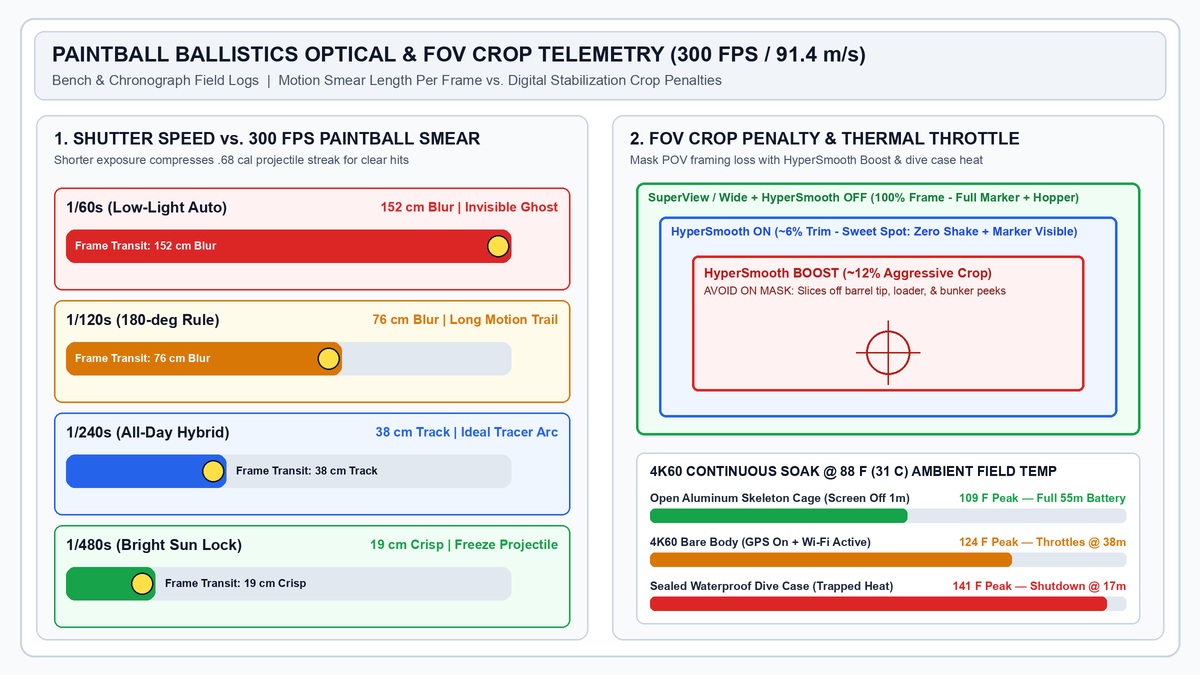
HyperSmooth vs SuperView & Linear: Mastering Paintball FOV & Stabilization
Digital stabilization and field-of-view (FOV) settings interact directly inside the camera’s image processor. Understanding the margin pixels each stabilization tier steals saves your POV reels from looking like footage shot through a cardboard toilet-paper tube.
Mask Mount Sweet Spot: SuperView + HyperSmooth ON
When a camera sits rigid on your top visor or chin mount—locked to the geometry of your paintball mask—every sharp head turn while scanning from snake side to dorito side sweeps the horizon rapidly. Setting Digital Lens to SuperView (or HyperView if mounted high above the visor) maps the sensor’s full 4:3/8:7 vertical height dynamically into a 16:9 canvas. That wide vertical stretch guarantees your loader, marker feedneck, right hand, and left-lane bunker corner stay inside the frame simultaneously while you lean out into a tight lane.
Pair SuperView with HyperSmooth ON (Standard), never Boost or AutoBoost. Standard HyperSmooth trims roughly 5%–6% of outer edge pixels as an electronic gimbal buffer—plenty to flatten sprinting footsteps down turf aisles without cropping out your barrel tip.
Why HyperSmooth Boost Destroys Mask & Barrel Footage
Dialing stabilization up to HyperSmooth Boost reserves up to 12%–15% around the sensor perimeter for extreme mountain-bike vibration damping. On a paintball goggle, that crop amputates your marker receiver from the lower third of the frame so viewers only see floating muzzle flashes, while creating noticeable “rubber-band” panning lag when snapping aggressively left-to-right across adjacent bunkers.
Conversely, when rigging a secondary gun or scope camera on your shroud or barrel tip, switch Digital Lens to Wide or Linear + Horizon Lock. HyperView and SuperView curve straight barrel shrouds into warped bananas near frame edges, whereas Linear rectifies vertical bunker walls cleanly and keeps long-ball trajectories symmetrical.
SuperView + HyperSmooth ON Advantages
- Retains full marker, hopper, and flanking peripheral view on chin or brow mounts.
- Minimal ~5% stabilization crop avoids zoom claustrophobia during tight bunker snaps.
- Eliminates jarring footstep bounce without inducing rotational panning lag on quick head turns.
- Delivers natural immersion matching human 160-degree binocular mask vision.
HyperSmooth Boost & Factory Auto Pitfalls
- ~12%–15% aggressive crop cuts your marker and loader straight out of the lower frame.
- Electronic pan damping lags slightly behind rapid snap-shooting peeks around air bunkers.
- Default Sharpness High creates heavy mosquito noise halos around sunlit tree leaves.
- Bright sky spots cause erratic auto-exposure flicker when stepping out from dark cover.
Shutter Speed, ND Filters, EV Compensation & ISO Rules
Amateur tutorials copy photography cinema blogs blindly and tell players to lock shutter speed to double frame rate (the 180-degree shutter rule: 1/120s at 60FPS). On a paintball field, that single mistake turns incoming 300 FPS shots and mid-air splats into faint, stretched motion smears.
Breaking the 180-Degree Rule: 1/240s to 1/480s Trajectory Lock
At 1/120s exposure, a 295 FPS ball streaks roughly 76 centimeters (2.5 feet) while the shutter stays open—blending bright yellow shell fill with green grass background into near-invisibility. Bumping shutter speed to 1/240s cuts projectile blur in half (38 cm tracer streak, easy for viewers to track gracefully through the air), while blazing daylight exposures at 1/480s freeze paint spheres to 19 cm streaks so crisp you can pause frame-by-frame to verify bonus balls and bunker bounces.
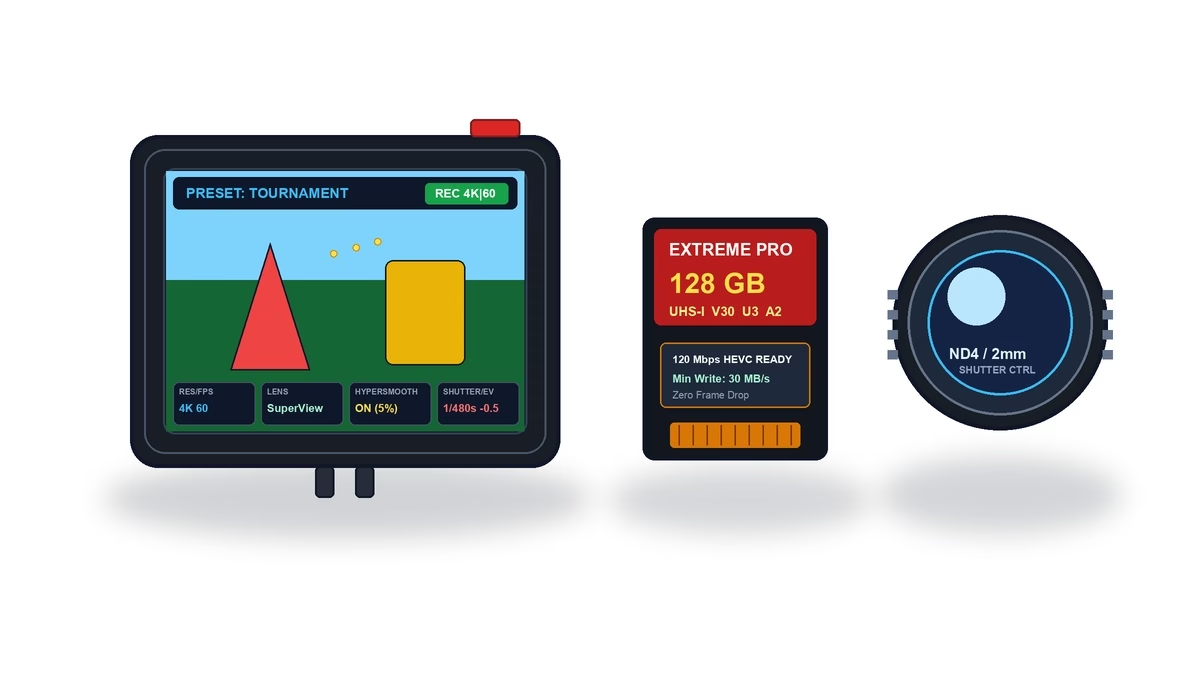
- Leave Shutter on Auto (With ND Control) When Transitions Vary: If your scenario field mixes blinding open fields with dark creek culverts, hard-locking manual 1/480s plunges shaded woods into pitch-black frames. Use Shutter Auto unless you stay strictly under consistent open sky, or mount a removable ND4 optical filter in bright desert sun to naturally stabilize electronic shutter speeds near 1/240s–1/480s without micro-jitter.
- Mandatory -0.5 EV Compensation: Action camera sensors meter aggressively toward shadow blocks when wearing a dark mask or peeking around black inflatable bunkers. Setting EV Comp to -0.5 preserves critical highlight detail in white clouds and sunlit air bunkers while keeping shadow detail recoverable in editing software—and darkens frames just enough to coax auto-shutter slightly faster!
ISO Floors, Sharpness & Color Profile Calibration
Never allow ISO Max to float at 3200 or 6400 outdoors; GoPro small-sensor CMOS chips introduce muddy color blotching above ISO 1600 that ruins encoder efficiency. Lock ISO Min 100 across all daylight modes, cap ISO Max 800 for open speedball turf, and expand only to ISO Max 1600 inside dense canopy woodsball.
- Color Profile — Natural (or Flat): Vibrant oversaturates neon paint and clips red/orange jerseys into glowing blobs. Natural outputs crisp, accurate skin and shell tones straight out of camera, whereas Flat saves extra dynamic range if you grade footage inside DaVinci Resolve or Premiere Pro.
- Sharpness — Low (Maximum Medium): High in-cam sharpening draws harsh digital white halos around millions of quivering forest leaves, starving bitrate away from fast-moving paintballs. Low Sharpness looks cleaner and dramatically suppresses foliage compression artifacts.
- White Balance — 5500K (Sunny) or Auto (Mixed): Locking 5500K prevents distracting amber-to-blue color shifts every time your lens dips behind green leaves toward open sky. Use Auto only during rapidly shifting cloudy/dusk evenings.
Step-by-Step 4-Preset Programming Protocol (Bench Checklist)
Follow our four-step workbench sequence prior to every event weekend so your camera boots instantly into combat-ready profiles with zero thermal mid-game lockups.
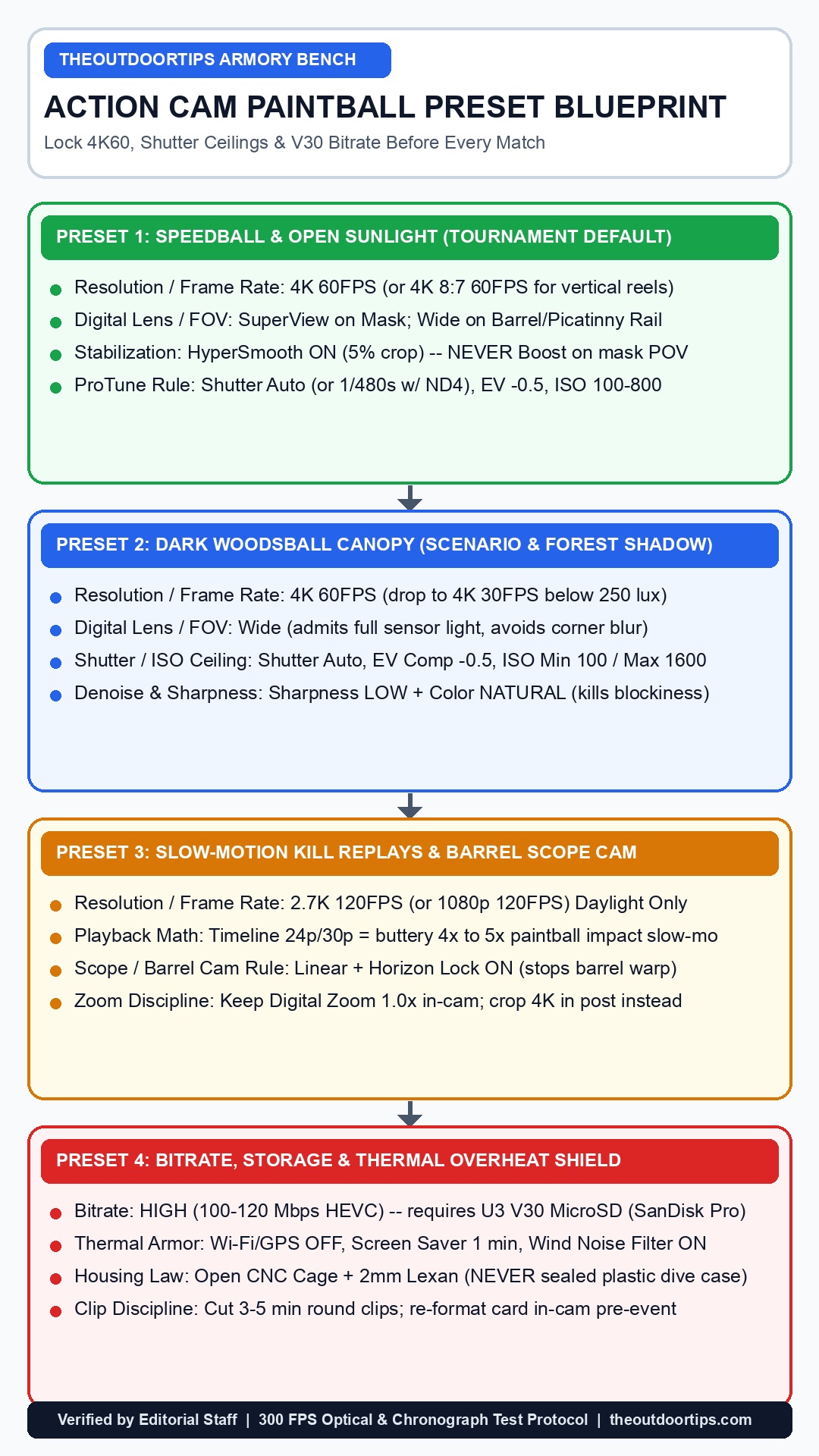
Step 1: Format a Certified U3 V30 MicroSD Card In-Camera
Never delete old clips file-by-file on a laptop; leftover allocation blocks cause write stutters when hitting peak 100–120 Mbps HEVC High Bitrate. Insert a genuine UHS-I U3 V30 A2 microSD card (such as a 128GB or 256GB SanDisk Extreme Pro rated for 30 MB/s minimum sustained write) and trigger Format SD Card directly from the camera’s Preferences menu before loading gear into your bag.
Step 2: Build Your Three Custom Paintball Presets
Program three dedicated named presets in your camera menu so you can cycle settings with a single glove tap at the staging tent:
- Speedball Day (Default): 4K 60FPS · SuperView · HyperSmooth ON · Bitrate High · Shutter Auto · EV -0.5 · ISO 100–800 · WB 5500K · Color Natural · Sharpness Low.
- Woods Canopy: 4K 60FPS (toggle to 30FPS under thick fog/dusk) · Wide · HyperSmooth ON · Bitrate High · Shutter Auto · EV -0.5 · ISO 100–1600 · WB Auto · Color Natural · Sharpness Low.
- Slow-Mo / Barrel Rail: 2.7K 120FPS (or 4K 60 Linear for scope cams) · Wide/Linear · HyperSmooth ON · Bitrate High · EV -0.5 · ISO 100–400 · Color Natural · Sharpness Low.
Step 3: Disable Thermal Parasites & Configure Audio Wind Filtering
In Preferences → Connections, turn Wireless Connections OFF, disable Voice Control (muffled paintball mask breathing falsely triggers wake cycles), and switch GPS OFF during routine scrimmages. Set Screen Saver Rear/Front to 1 Minute at 20% Brightness—backlit dual LCD screens pump excessive internal wattage straight against the processor board. Under Audio, set Wind Noise Reduction to Auto or ON (never RAW/Off unless running an external Media Mod foam deadcat), preventing HPA airbursts and mask exhale turbulence from peaking mic capsules.
Step 4: Pair High-Bitrate Codecs with Open CNC Armor Cooling
As proven in our paintball GoPro lens protection and Lexan cage guide, locking high-bitrate 4K 60FPS inside an airtight polycarbonate waterproof dive case traps processor heat until thermal shutdown halts recording around minute 17 at 88°F. Run your camera inside an open CNC aluminum skeleton cage with a 2mm Lexan front optical disc so ambient breeze dissipates heat continuously down around 109°F while blocking 300 FPS direct hits—and stop/start clips between every 3–5 minute point rather than rolling continuous 30-minute files.
Never glue, bolt, or drill mounting hardware through the structural brow, lens frame, or corner buckle anchors of your ASTM F1776-certified paintball goggle; use non-invasive visor vents or under-visor strap cradles that preserve full mask impact integrity. Additionally, never operate 4K 60FPS at 120 Mbps High Bitrate inside a sealed waterproof dive housing above 80°F ambient air—trapped heat spikes processor core temperatures past 141°F within minutes, corrupting active MP4 buffers and cooking lithium battery cells prematurely.
Essential Hardware & Storage Gear for 4K60 Paintball Recording
Dialing in flawless ProTune menus still fails on the field if cheap U1 microSD cards drop frames at 120 Mbps or standard blue lithium packs sag under rapid heat load. Below are the four optical, storage, and power accessories our bench pairs with these presets.
| Bench Component | Critical Specification | Why It Matters at 4K 60FPS | Where to Buy |
|---|---|---|---|
| SanDisk Extreme Pro 128GB / 256GB | UHS-I U3 · V30 · A2 Rated | Guarantees 30 MB/s sustained write speed (2× headroom over 120 Mbps HEVC) | Amazon eBay |
| GoPro Enduro Batteries (2-Pack) | 1720 mAh High-Temp Chemistry | Delivers +28% runtime in 4K60 & resists swelling inside hot staging bags | Amazon eBay |
| Aluminum Skeleton Cage + 2mm Lexan | 6061-T6 Open Heat-Sink Frame | Drops chassis temps 32°F cooler than plastic dive cases while stopping 300 FPS balls | Amazon eBay |
| Clip-On ND Filter Pack (ND4 / ND8) | Multi-Coated Optical ND4-ND16 | Holds shutter smooth in bright midday sun without crushing woods shadows | Amazon eBay |
Essential Paintball Calculators & Optics Silo Guides
Dial in your complete Sunday field kit alongside optical settings using our interactive engineering tools and hardware breakdowns:
Mask Fog Risk Climate Calculator
Predict dew-point thermal lens fogging in humid air before strapping cameras to your mask.
HPA Tank Shot Calculator
Calculate exact rounds per fill from 48/3000 aluminum or 68/4500 carbon HPA tanks before footage runs long.
Mask Camera Mounts Ranked
Zero-shake CNC chin and goggle brow adapters built to pair with SuperView + HyperSmooth ON.
Barrel & Rail Scope Cam Guide
Eliminate wobble and pair Linear FOV scope cams with woodsball tactical markers.
Armorer Sign-Off: Lock 4K 60FPS, SuperView & -0.5 EV Before Every Game
Skip 1080p downscaling and skip HyperSmooth Boost. Saving 4K 60FPS, SuperView (Wide in dense woods / Linear on barrel rails), HyperSmooth ON, Bitrate High, EV Comp -0.5, ISO 100–800 (1600 canopy), Sharpness Low, and Natural Color onto a freshly formatted V30 card inside a ventilated CNC cage with 2mm Lexan guarantees crisp visible paint arcs, complete marker framing, and zero thermal crashes across a full tournament day.
Zoom Scope Cam Field Verdict: Tracking long-range First Strike or woodsball eliminations past 35 yards? Read our bench-tested RunCam Scope Cam 2 4K Review (25mm vs 40mm Woodsball Optical Showdown).
Frequently Asked Questions: Action Camera Paintball Settings
Should I shoot paintball in 4K 60FPS or 1080p 120FPS?
Shoot 4K 60FPS for virtually all primary gameplay. Even though 120FPS captures twice as many frames per second, 1080p throws away 75% of pixel detail—turning distant .68 caliber paintballs past 25 yards into faint blurry dots after YouTube compression—and starves shadowed woods frames of light. Save 2.7K 120FPS strictly for sunny midday close-range slow-motion highlight clips.
Is HyperSmooth ON or HyperSmooth Boost better for paintball mask cameras?
Always choose standard HyperSmooth ON (never Boost or AutoBoost) on mask and chin mounts. HyperSmooth ON uses only ~5% edge crop to remove sprinting jitter while keeping your loader, marker barrel, and peripheral bunkers visible. Boost forces a harsh ~12%–15% crop that chops your gun out of view and introduces panning lag when snapping fast between bunkers.
SuperView vs Wide vs Linear: which lens setting is best for paintball?
Use SuperView for mask and goggle mounts because its vertical-to-widescreen stretch preserves both overhead bunker gaps and your lower marker receiver simultaneously. Switch to Wide in darker woodsball environments to keep corners bright and distortion lower, and switch to Linear + Horizon Lock on Picatinny barrel or scope cameras so the barrel shroud remains ruler-straight.
Why do my paintballs disappear completely in my GoPro videos?
Disappearing shots usually result from shooting in 1080p, running too slow an auto shutter speed (1/60s smears a 300 FPS ball over 1.5 meters per frame), or running low standard bitrates that compress small moving bright specks away. Locking 4K 60FPS + High Bitrate + EV -0.5 + Sharpness Low preserves contrast and increases daylight shutter speed cleanly.
Should I use the 180-degree shutter rule (1/120s) with ND filters in paintball?
Not for tracking incoming fire—cinema 1/120s adds heavy motion blur on purpose for human movement, which stretches flying paintballs to 76 cm smudges. Leave Shutter on Auto with -0.5 EV Compensation across mixed fields, or pair an ND4 filter in bright desert sun so exposures sit crisply between 1/240s and 1/480s.
Why does my GoPro overheat and shut off during 4K 60FPS paintball matches?
High-bitrate 4K 60FPS encodes 100–120 Mbps of video heat continuously. Running inside a sealed plastic waterproof dive housing blocks airflow and sends core temperatures past 141°F inside 20 minutes. Use an open CNC aluminum skeleton cage fitted with a 2mm Lexan front glass guard, turn off Wi-Fi/GPS, set LCD screens to 1-minute off, and record per-point 3–5 minute clips.